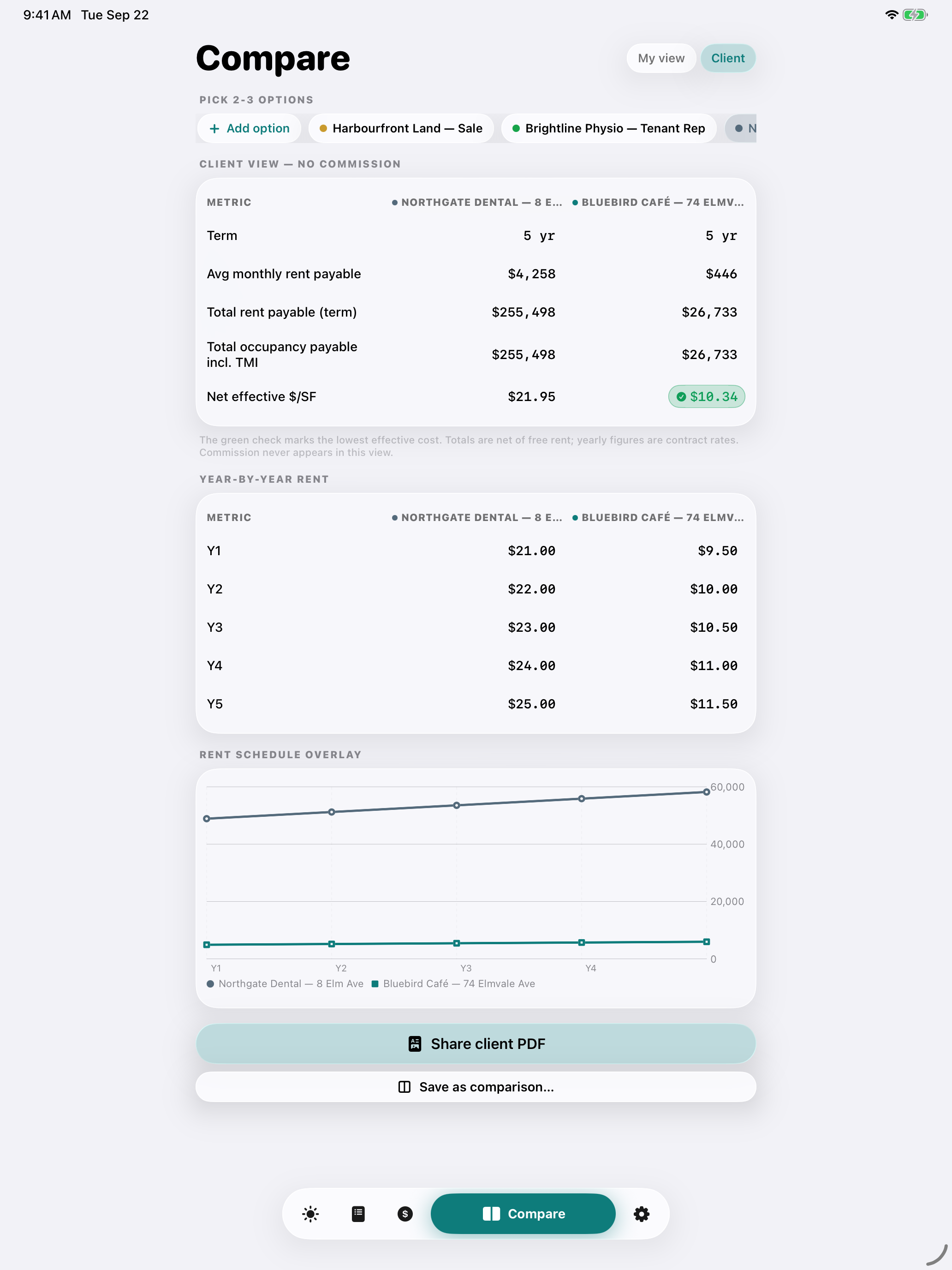
Bring rent steps, free rent and TMI into one comparison on your iPhone or iPad. Review the modeled rent for your client’s options, then share a client PDF with Pro.
On-screen comparison is free. Client PDF export requires Pro. No DealDesk account required.
Actual app client view. Fictional lease options.
Keep a property shortlist Compare on screen free Client PDFs with Pro
For your next tenant shortlist
Shortlist. Compare. Present the options.
Build the shortlist
Keep candidate spaces as prospects before there’s a deal. Group options around a client or requirement, then select two or three to compare.
Free includes six prospects and three open deals. You enter and verify each option’s terms.
Compare modeled rent
Review rent schedules, base-rent concessions, entered TMI and net effective rent side by side. The client view excludes your commission figures.
On-screen comparison is free. Check the area, term and source assumptions before presenting the numbers.
Prepare the client PDF
With Pro, export the client comparison as a PDF to share through your chosen destination. Keep the selected property and promote it to a tracked deal when you’re ready.
Pro also adds unlimited prospects and deals. Current pricing appears in the app.
Actual client view. Fictional lease options.
A clearer conversation with your client
Explain why the rent totals differ.
See how your entered term, rent increases, free rent and TMI affect each option. Discuss the space, location and timing alongside the modeled rent total.
Budget separately for sales taxes, utilities outside TMI, parking, fit-out and other lease obligations. Verify the inputs against the lease and current property estimates.
Capture, check the source, edit and save. Share summary text free; PDF export requires Pro. Capture does not fill or change calculator figures and reminders.
27 seconds · Illustrated workflow guide, not an app recording.
In Compare, add two prospect options and enter verified terms. Select both, then choose Client to review the rent comparison. Use the free on-screen view before deciding whether you need Pro for the client PDF.
Choose monthly, yearly or a one-time Lifetime purchase. The app shows current pricing and any eligible trial for your App Store region. Subscriptions renew automatically; manage or cancel in your Apple Account.
Before your first deal.
Does capture automatically fill the calculator?
No. Capture organizes matched source passages into a summary for you to review and edit. Calculator amounts, dates, commission settings and reminders remain separate inputs.
Can I import a scanned lease?
Yes. DealDesk reads PDF text and uses on-device text recognition for photos and scanned pages. It organizes English keyword matches rather than generating a complete legal abstract. Review the original, especially tables, definitions, amendments and conflicting terms. An empty field means the term was not recorded.
What can I share without Pro?
Share reviewed summary text, calculation text and images. On-screen client comparisons are free. Pro adds summary PDFs, client comparison PDFs and commission invoices.
Where are my documents and terms stored?
Document processing happens on your device. Selected terms and excerpts are saved with your deal and can sync through your private iCloud database. Original imported documents and the full capture-session text are not saved with the deal. Exports are shared only to destinations you choose.
Are the 50% splits fixed?
No. They are editable starting values. Use the brokerage, team, co-broke and other terms in your own agreement. Rates are negotiable.
Your book stays yours.
No DealDesk login, ad network, or third-party analytics in the app. Work on your device; iCloud sync uses your own private Apple database when available. Exports go to the destinations you choose.
 DealDesk CRE